UCLA Swipe Counter1.1.2
Continue to app
Free Version
Publisher Description
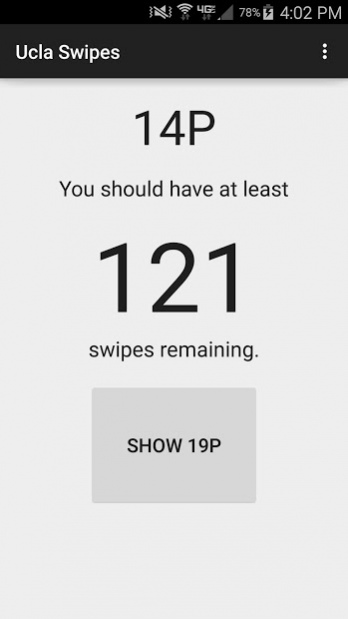

Displays the number of dining hall swipes you should have at any given time. Includes options for the 19P and 14P meal plans. The number displayed calculates the number of swipes you should be at assuming you swipe until lunch of Friday of finals week, so this number is the absolute minimum you'll need to stay satisfied.
THIS APP COMES WITH A WIDGET! So you don't even need to ever open the app up. Just place the widget on any page and it'll update by the hour, so you can check without searching for the app.
The app itself does not require any internet connection to calculate the number of swipes, so you can check even in the depths of Boelter Hall!
About UCLA Swipe Counter
UCLA Swipe Counter is a free app for Android published in the PIMS & Calendars list of apps, part of Business.
The company that develops UCLA Swipe Counter is JFague. The latest version released by its developer is 1.1.2. This app was rated by 2 users of our site and has an average rating of 4.0.
To install UCLA Swipe Counter on your Android device, just click the green Continue To App button above to start the installation process. The app is listed on our website since 2016-07-06 and was downloaded 58 times. We have already checked if the download link is safe, however for your own protection we recommend that you scan the downloaded app with your antivirus. Your antivirus may detect the UCLA Swipe Counter as malware if the download link to com.jaf3.uclaswipes is broken.
How to install UCLA Swipe Counter on your Android device:
- Click on the Continue To App button on our website. This will redirect you to Google Play.
- Once the UCLA Swipe Counter is shown in the Google Play listing of your Android device, you can start its download and installation. Tap on the Install button located below the search bar and to the right of the app icon.
- A pop-up window with the permissions required by UCLA Swipe Counter will be shown. Click on Accept to continue the process.
- UCLA Swipe Counter will be downloaded onto your device, displaying a progress. Once the download completes, the installation will start and you'll get a notification after the installation is finished.
Program Details
System requirements
Operating systems
Android
Download information
File size
2.0 MB
Total downloads
58
Pricing
License model
Free
Price
Version History
Here you can find the changelog of UCLA Swipe Counter since it was posted on our website on 2016-10-11.The latest version is 1.1.2 and it was updated on Soft112 on 02 November, 2026.See below the changes in each version:
version 1.1.2
posted on 2016-07-06
Fixed the app and widget from crashing during the months of July and August.
